
What are your supplier invoices hiding?
Contractors are losing $500–$1,000 every week to supplier overcharges, duplicate billings, and missed discounts they never catch.
Schedule a quick 15-minute call to see how InvoiceIQ can work for you…and get the first month FREE!
Built By Trades People,
For Trades People.

We were losing $500–$1,000 every week to supplier overcharges we didn’t know existed.
InvoiceIQ found them automatically — for $20/month.
“With the amount of invoices we get daily and the amount of line items, it’s virtually impossible to have any one human being — or even a team — checking those. We’d have to hire six people just to check invoices.”
– Lacy McCormick,
Operations Manager,
Fortress Framing
Westminster, CO


Real World Results
Plumbing Company
Rocky Mountain Plumbing (Denver, CO): “We process 200 supplier invoices monthly for pipes, fittings, and fixtures”
Before InvoiceIQ
- 6 hours weekly entering invoices into QuickBooks
- Found errors only when customers complained
- Lost $800 last quarter to duplicate charges
With InvoiceIQ
- Invoices automatically uploaded from supplier emails
- AI caught $1,200 in overcharges in first month
- Invoice processing time: 30 minutes weekly
- QuickBooks stays current automatically
Monthly InvoiceIQ - Cost & Savings
$20 Monthly savings: $1,200 + 5.5 hours of admin time ROI: 2,900%
HVAC Contractor
Colorado Comfort Systems (Colorado Springs, CO) Scenario: “We buy equipment, parts, and materials from 8 different suppliers.”
Before InvoiceIQ
- Different pricing agreements with each supplier
- Manually checking if bulk discounts applied correctly
- Missing early payment discounts due to processing delays
With InvoiceIQ
- AI knows each supplier's pricing tiers
- Automatically flags when bulk discounts aren't applied
- Invoices processed same day for early payment savings
- Supplier pricing changes tracked automatically
Monthly InvoiceIQ - Cost & Savings
$56 (280 invoices) Monthly savings: $2,100 + 8 hours weekly ROI: 1,800%
General Contractor
Front Range Builders (Fort Collins, CO) Scenario: “We manage invoices for lumber, concrete, electrical, and subcontractors.”
Before InvoiceIQ
- 1,500 invoices monthly across multiple projects
- Project managers spending hours on invoice entry
- Billing errors affecting job profitability
With InvoiceIQ
- Project costs automatically categorized by job
- Change orders and price variations flagged immediately
- Project profitability stays accurate in real-time • Managers focus on building, not bookkeeping
Monthly InvoiceIQ - Cost & Savings
$220 (1,100 additional invoices) Monthly savings: $4,800 + 20 hours weekly ROI: 1,090%
Calculate Your Potential Savings
Schedule a quick 15-minute call to see how InvoiceIQ can work for you…and get the first month FREE!
Plumbing Company
Rocky Mountain Plumbing (Denver, CO): “We process 200 supplier invoices monthly for pipes, fittings, and fixtures”
Before InvoiceIQ
- 6 hours weekly entering invoices into QuickBooks
- Found errors only when customers complained
- Lost $800 last quarter to duplicate charges
With InvoiceIQ
- Invoices automatically uploaded from supplier emails
- AI caught $1,200 in overcharges in first month
- Invoice processing time: 30 minutes weekly
- QuickBooks stays current automatically
Monthly InvoiceIQ - Cost & Savings
$20 Monthly savings: $1,200 + 5.5 hours of admin time ROI: 2,900%
HVAC Contractor
Colorado Comfort Systems (Colorado Springs, CO) Scenario: “We buy equipment, parts, and materials from 8 different suppliers.”
Before InvoiceIQ
- Different pricing agreements with each supplier
- Manually checking if bulk discounts applied correctly
- Missing early payment discounts due to processing delays
With InvoiceIQ
- AI knows each supplier's pricing tiers
- Automatically flags when bulk discounts aren't applied
- Invoices processed same day for early payment savings
- Supplier pricing changes tracked automatically
Monthly InvoiceIQ - Cost & Savings
$56 (280 invoices) Monthly savings: $2,100 + 8 hours weekly ROI: 1,800%
General Contractor
Front Range Builders (Fort Collins, CO) Scenario: “We manage invoices for lumber, concrete, electrical, and subcontractors.”
Before InvoiceIQ
- 1,500 invoices monthly across multiple projects
- Project managers spending hours on invoice entry
- Billing errors affecting job profitability
With InvoiceIQ
- Project costs automatically categorized by job
- Change orders and price variations flagged immediately
- Project profitability stays accurate in real-time • Managers focus on building, not bookkeeping
Monthly InvoiceIQ - Cost & Savings
$220 (1,100 additional invoices) Monthly savings: $4,800 + 20 hours weekly ROI: 1,090%
InvoiceIQ pays for itself the first month.
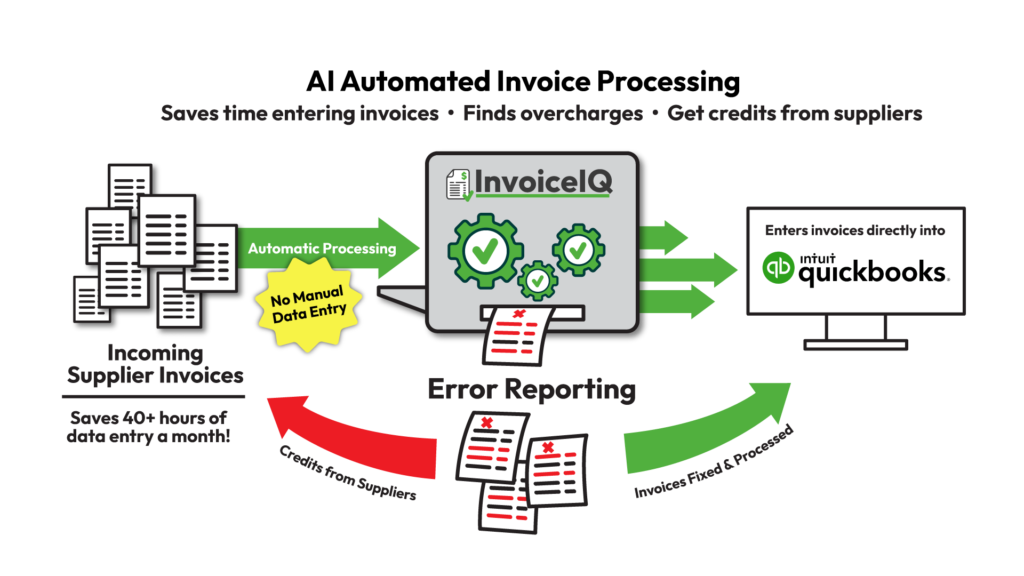
Stop entering invoices the slow way by hand. InvoiceIQ will quickly upload and review all your invoices for errors, then push them into QuickBooks.
See how InvoiceIQ can save you time and money today!
Easy Pricing:
- Monthly Base Subscription - Only $20!
- Includes your first 500 invoices each month.
- $0.20 per invoice after the first 500.
Businesses with a high-volume of invoices (over 10,000 invoices/month), please contact us about enterprise pricing.
Schedule a Demo to see how InvoiceIQ can help with your invoice problems.
First month FREE when you book a demo!
Why process your invoices the old fashion way?
"*" indicates required fields
4%
of all invoices contain pricing errors
10%
of invoices are potential duplicates
40hrs/
month
is the average time lost to manual invoice processing
Frequently Asked Questions
A: Our AI reads even challenging documents. If it can’t process something, we’ll work with you to improve the image or provide manual review.
A: Yes! InvoiceIQ doesn’t change your payment process—it just makes sure you’re paying the right amounts.
A: You can override any flag with one click. The AI learns from your decisions and gets better over time.
A: Update your pricing agreements in InvoiceIQ and we’ll monitor against the new rates immediately.
A: Set date ranges for special pricing, and InvoiceIQ will apply them automatically during those periods.